
How do I sell mulligans?
Go to Settings, then Payments, and turn on Sell mulligans. Set a price for one and the most each player can have. Players buy them on their team page, you add them on the day for cash, and captains mark them on the scorecard.
On this page
A mulligan is a do-over shot, and selling them is easy money for your cause. In Pinli each mulligan belongs to one player. Players buy them before the round, and the captain checks them off on the scorecard when they’re used.
Turn them on
- Go to Settings, then Payments.
- Under Mulligans, turn on Sell mulligans.
- Set the Price for one and the Most per player. Both start empty, since tournaments price them differently.
- Choose who pays the card fee.
- Click Save.
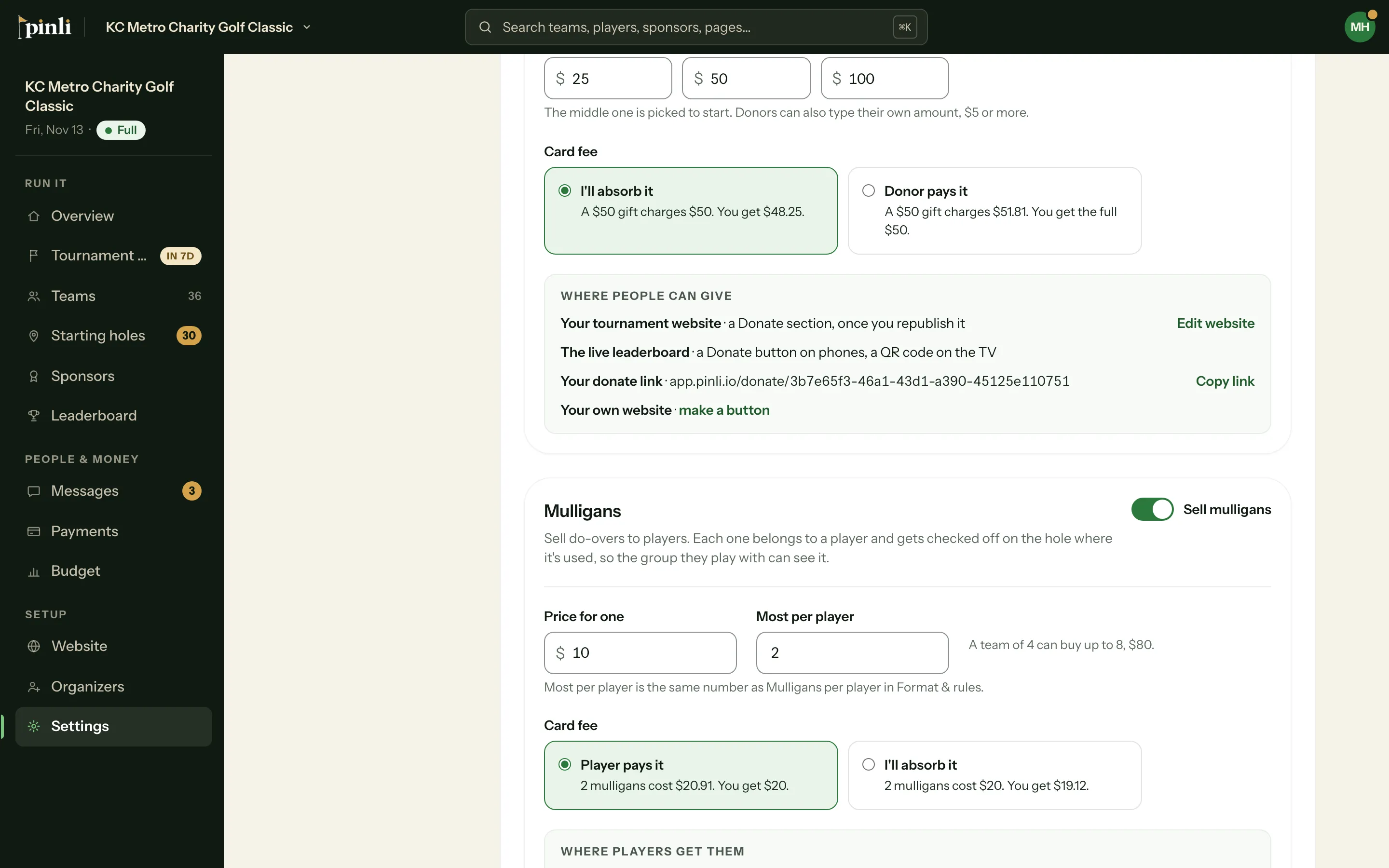
Most per player is the same number as Mulligans per player under Format & rules, so changing it in one place changes it in both.
You can also set a price when you create a tournament: under House rules, pick how many mulligans each player gets, then fill in Sell them?
Who pays the card fee?
Stripe charges 2.9% + 30¢ on each card payment. For two $10 mulligans:
- Player pays it is the default. The player is charged $20.91 and you get the full $20.
- I’ll absorb it. The player is charged $20 and you get $19.12.
This setting is only for mulligans. Teams, sponsors and donations have their own.
Where players get them
- Their team page. A Mulligans card shows what each player has. Anyone on the team can buy mulligans for anyone on the team, and the captain can buy for the whole team in one payment. Online buying needs your tournament activated and Stripe connected. Until then, the card tells players to get them from you at check-in.
- From you on the day. See below.
Pinli never lets a player go over the most per player. If two teammates try to buy the last one at the same time, only one gets it.
Add them on the day
- Open the team: from Teams on the web, or the team’s page in the Pinli app. In the app you can also tap + Mulligans on the check-in desk.
- Tap Add mulligans.
- Pick how many for each player. Max for everyone fills each player up to the limit.
- Choose Cash or check or Comped.
- Tap Add. The button shows how much to collect.
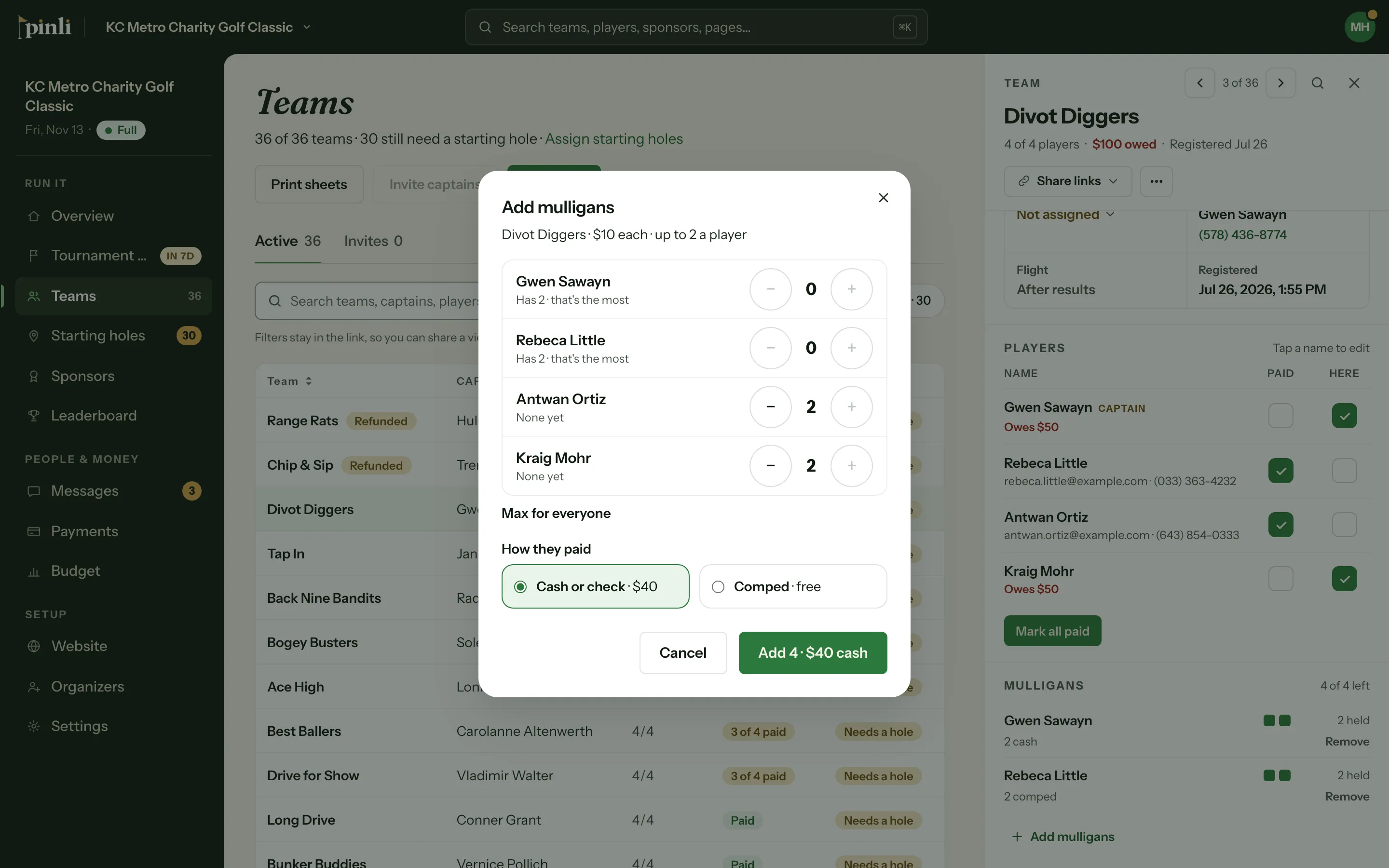
To take back one you added by mistake, remove it from the team’s Mulligans section. Pinli won’t let you remove one that’s already been used.
On the course
The captain marks a mulligan on the hole where a player used it. The other team in their group sees each one, so everyone stays honest. On your Leaderboard, a small gold dot marks every hole where someone used one. Hover over it to see who.
Where’s the money?
Mulligans bought online show on the Payments page under their team, marked “Mulligans”. Ones you added for cash show as cash rows, at the price when you added them. A Mulligans total sits at the top, next to Donations. Comped mulligans aren’t money, so they don’t show up there.
Common questions
How do I refund mulligans? Refund the payment in Stripe. A full refund removes the mulligans it bought. Any already used stay on the scorecard.
Can I change the price later? Yes. The new price applies to future sales. Mulligans already sold, and cash already collected, keep their price.
What if I turn mulligans off after selling some? Selling stops, but players keep the ones they have and can still use them on the scorecard.
What if I remove a team that bought mulligans? Pinli asks you to confirm you’ll refund them in Stripe. Removing a team doesn’t refund anything.
Can players buy them when they sign up? Not yet. That comes when sign-up moves to the new checkout.