
How do I add registration to the website I already have?
On the Website page, open Embed on your site. Add one line to your site's header, once, then make buttons for registration, sponsors, donations or contact and paste them anywhere.
On this page
If your charity or club already has a website, you don’t need a second one. Add Pinli to the site you have, then put buttons wherever you want them. Everything people submit still comes into Pinli.
Before you start: you need to be able to add custom code to your website. If someone else runs your site, send them this page.
Step 1: add Pinli once
- Open your tournament, go to Website, and click the Embed on your site tab.
- Under Add this once to your site’s header, click Copy code.
- Paste it into your site’s header code. You only do this once, and it works on every page.
Where that box is depends on your website builder:
- Squarespace: Settings, then Developer Tools, then Code Injection, then Header. Code injection needs a paid plan.
- Wix: Settings, then Custom Code, then Add Custom Code. Set it to Head and All pages.
- WordPress: a header-code plugin, such as WPCode, or your theme’s header settings.
- Something else: look for “header code”, “head code” or “custom code” in your site’s settings.
Step 2: make a button
- Under Make a button, pick what it should do: register a team, sponsor, donate or contact.
- For a donation, pick the amount it starts with, and whether it’s a button or the form right on the page.
- Change the button text if you like.
- Click Copy button and paste it into an HTML or code block on your page. Make as many as you like.
Using your site builder’s own button? Set its link to the one shown under the code, like #pinli-donate. You have to do it this way on Wix: its HTML embeds run separately from the rest of your page, so a button pasted into one can’t open Pinli.
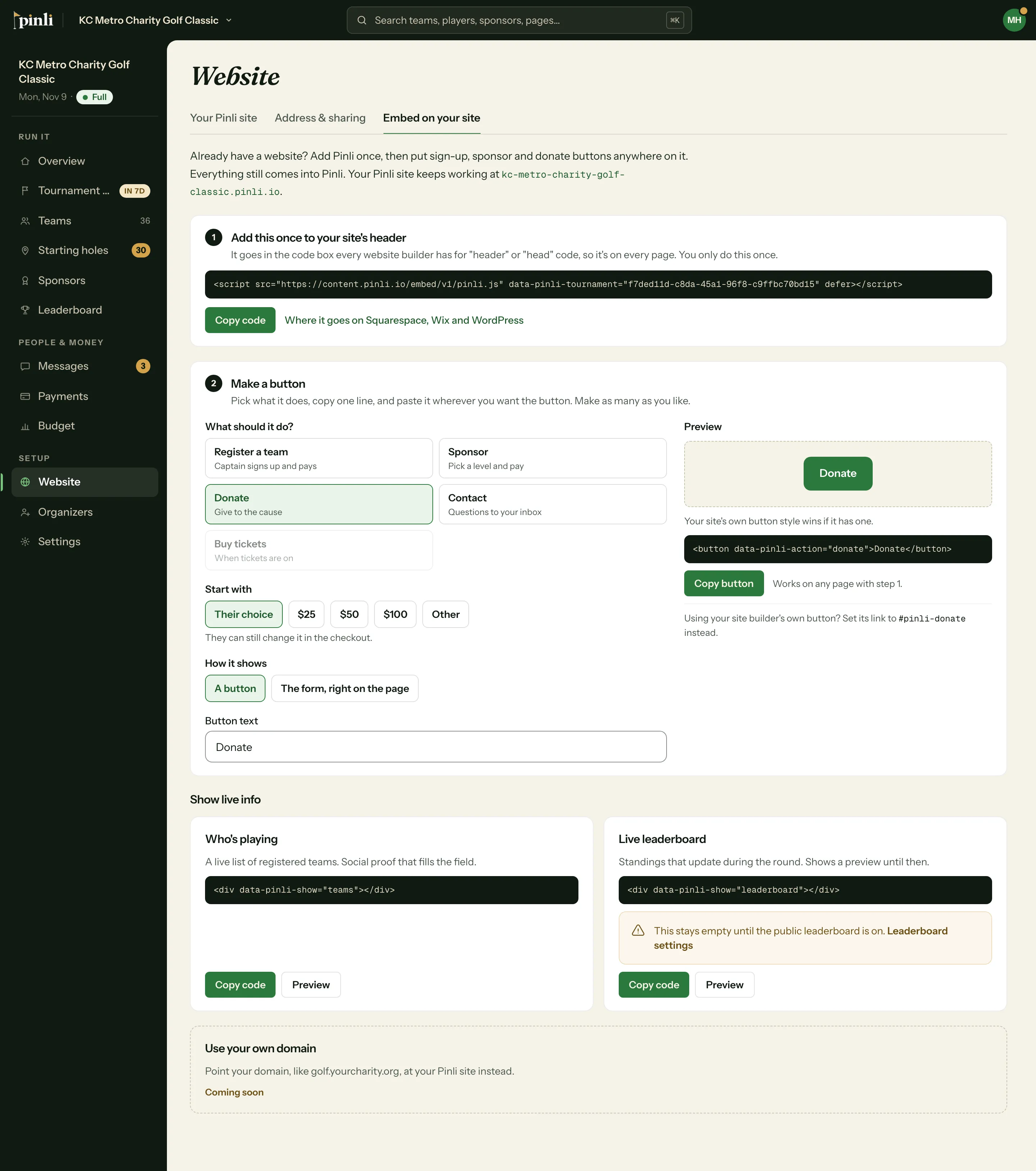
Your site’s own button styling applies if it has any. If you have a developer, they can also control Pinli from code.
Show live info
Further down the tab, Who’s playing is a live list of registered teams, and Live leaderboard shows standings that update during the round. Each is one line to paste where you want it, on any page with step 1.
I already have the old code on my site
It keeps working, so you don’t need to change anything. To add new buttons, do step 1 once. You can have both on the same page.
Can teams pay when they sign up?
When your tournament is activated and Stripe is connected, the registration and sponsor forms ask for payment right after someone signs up. A captain can pay for the whole team, pay just for themselves, or pay later. To turn this off, go to Settings → Payments and uncheck Ask for payment at registration. There’s one for teams and one for sponsors.
Anyone who skips paying still gets an email with a link to pay.
Common questions
Do I need a Pinli website to use embeds? No. Embeds work on their own, even if you never publish a Pinli site.
Why is my leaderboard embed empty? It stays empty until the public leaderboard is on. Turn it on in Settings → Scoring & leaderboard.
Do I need to update the code when things change? No. Teams, sponsor levels, prices and scores update on their own. Paste the code once.
Do the trial limits apply to embeds? Yes. During the free trial, up to 5 teams and 2 sponsors can sign up, and online payment starts when you activate.