
How do I delete my Pinli account?
Go to Profile and click Delete account. Choose a new owner for any tournament you're the only owner of, type DELETE and confirm. It can't be undone.
Deleting your account removes your name, email, phone number and password from Pinli for good. Your tournaments aren’t deleted. They stay with the people still running them.
Before you start: if you’re the only owner of a tournament, decide who takes it over. They need to be an organizer on it already. If they aren’t, invite them first from Organizers.
Delete your account
- Open the account menu and click Profile.
- At the bottom, under Delete your account, click Delete account.
- For each tournament you’re the only owner of, choose what happens:
- Transfer ownership to: pick one of its organizers.
- Cancel this tournament: if there’s no one to hand it to. Its website comes down, sign-ups close, and we email its teams and sponsors. A tournament that’s already been played just stays as it is, with nobody managing it.
- Type DELETE in the box.
- Click Delete my account.
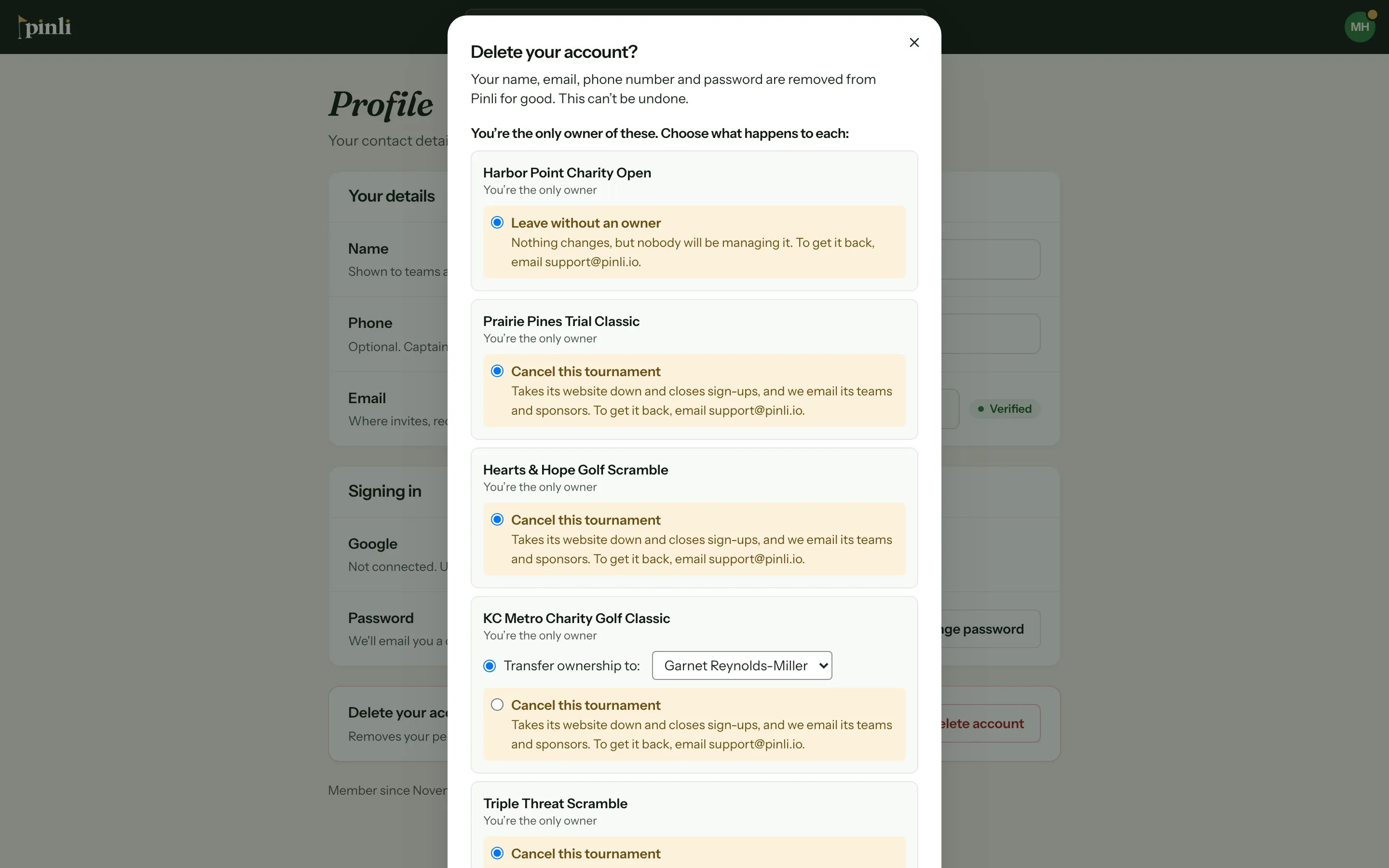
You’re signed out, and you get an email confirming the deletion.
In the iPhone app: tap your avatar, then Delete account at the bottom of the Account screen. The steps are the same.
What happens to my tournaments?
- Tournaments you’re the only owner of go to the person you picked, or get canceled if you chose that.
- Tournaments where you’re one of several organizers or owners carry on without you. You just lose access.
The window lists both before you confirm, so you can check.
Common questions
Can I undo it? No. There’s no way to restore a deleted account. You can make a new account with the same email later, but it starts empty, with no access to your old tournaments.
What if I canceled a tournament by mistake? Contact us at support@pinli.io. That’s the only way to get it back.
Can I hand a tournament over without deleting my account? Yes. On the tournament’s Organizers page, make the other person an Owner. Then you can Leave, or stay on as an organizer.