
How do I lock scores, finalize flights and announce winners?
On the Leaderboard, lock scoring, then finalize results and set the flight cut lines. Confirm the winners, print the awards sheet, and share the results link.
On this page
Wrapping up takes three steps: lock scoring, finalize results, and confirm the winners. The Leaderboard shows them as Scoring open, Locked and Final results. The Next card on the Tournament day page walks you through the same steps.
Before you start: decide your places and prizes in Settings › Scoring & leaderboard, under Places & prizes. You can also add prizes on the day, right on the results card.
Set places and prizes
A place is where a team finished. A prize is what that place takes home. Prizes are optional, and every winning place shows even without one.
- Flights sets how many groups win something. With One flight there’s a single set of winners, and Winners sets how many places (1st to 3rd until you change it).
- With 2 or more flights, the field is split by score when you finalize: the best scores are Flight A, the next group Flight B, and so on. Winners in each flight sets each flight’s count (the winner of each flight until you change it). Flight A’s winner is the field’s best score.
Prizes only show to organizers and on the printed awards sheet. They never appear on the TV or the public link.
1. Lock scoring
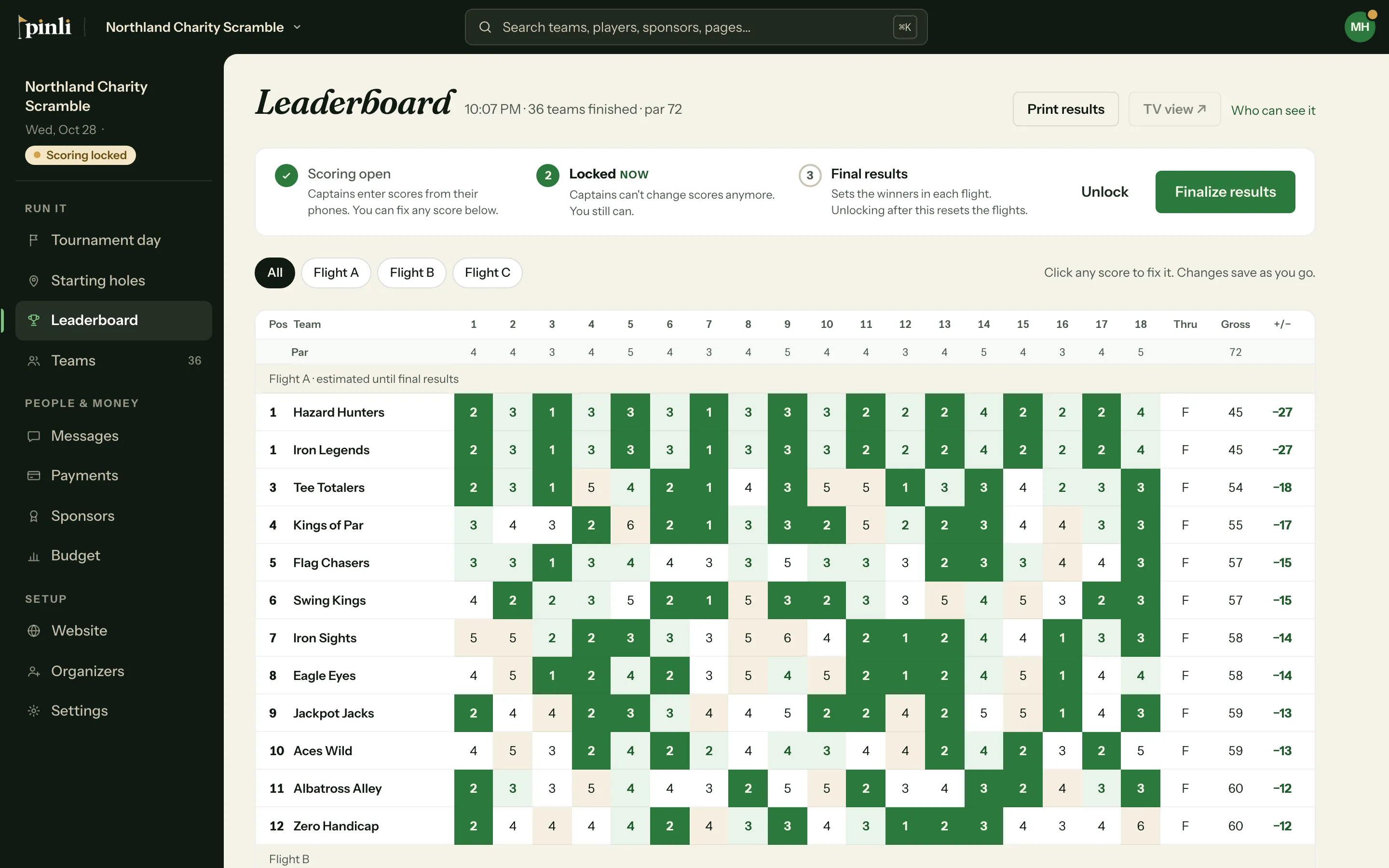
When the cards are in, click Lock scoring. Captains can no longer enter or change scores. You still can: click any score on the Leaderboard to fix it.
If some cards are still out, Pinli asks before locking. Captains won’t be able to enter the missing holes, but you can enter them yourself.
2. Finalize results
Click Finalize results. If your tournament has flights, you’ll see where each flight starts. Use Move line up or Move line down to shift a team across a cut line, for example when a tie falls on it. Teams stay in finishing order.
Click Finalize results to confirm. This sets the final standings and marks the tournament complete. After this, no one can change scores.
3. Confirm the winners
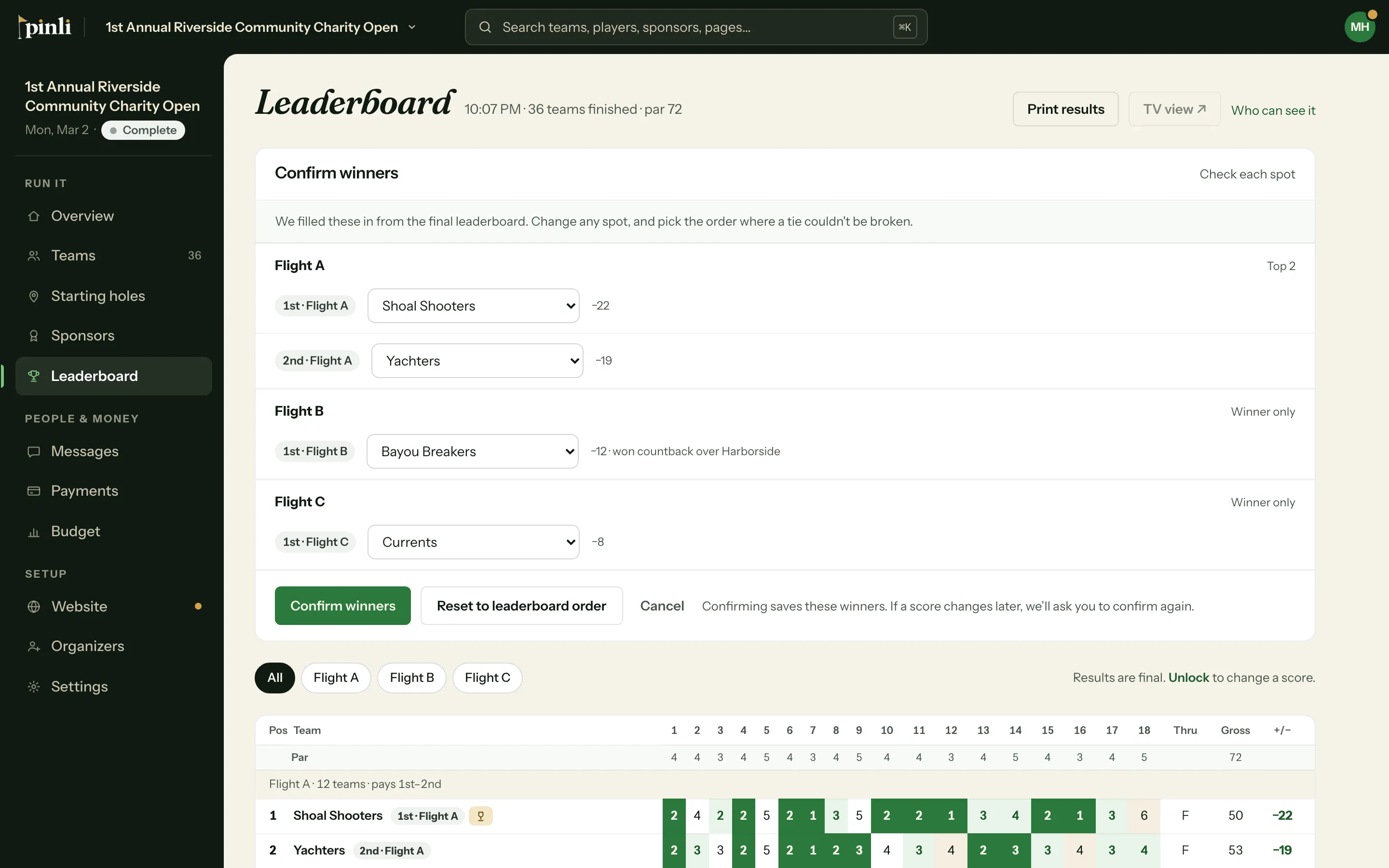
Pinli fills in the winners from the leaderboard. Check each spot and click Confirm winners. If a tie couldn’t be broken on a place that wins something, it’s flagged so you can choose the order. See How are ties broken?
4. Hand out prizes and share
On the Tournament day page:
- Print awards sheet: the first page lists winners in the order you’ll call them, last place up to 1st (with flights, the last flight first), with each team’s players, score and prize.
- Show on TV: the TV view switches to a podium for the top 3, or the top 3 in each flight.
- Copy results link: a link anyone can open to see the places.
Show on TV and Copy results link appear only when Anyone with the link is on. See How do I put the leaderboard on a TV?
Common questions
I need to change a score after finalizing. Can I? Yes. Click Unlock results on the Tournament day page or Unlock scoring on the Leaderboard. Captains can score again, the flights reset, and you finalize and confirm winners again afterwards.
What happens if a score changes after I confirm the winners? Pinli asks you to check the winners again, and Confirm winners comes back.
Can I lock scoring and then reopen it? Yes. Before you finalize, click Unlock on the Leaderboard and captains can enter scores again.